Exception Handling
This guide covers exception handling in AdonisJS applications. You will learn how to:
- Use the global exception handler to convert errors into HTTP responses
- Customize error handling for specific error types
- Report errors to logging services
- Create custom exception classes with self-contained handling logic
- Configure debug mode and status pages for different environments
Overview
Exception handling in AdonisJS provides a centralized system for managing errors during HTTP requests. Instead of wrapping every route handler and middleware in try/catch blocks, you let errors bubble up naturally to a global exception handler that converts them into appropriate HTTP responses.
This approach keeps your code clean while ensuring consistent error handling across your application.
The global exception handler
When you create a new AdonisJS project, the global exception handler is created in app/exceptions/handler.ts. It extends the base ExceptionHandler class and provides two primary methods:
- The
handleconverts errors into HTTP responses. - The
reportlogs errors or sends them to monitoring services.
Here's what the default handler looks like:
import app from '@adonisjs/core/services/app'
import { HttpContext, ExceptionHandler } from '@adonisjs/core/http'
import type { StatusPageRange, StatusPageRenderer } from '@adonisjs/core/types/http'

export default class HttpExceptionHandler extends ExceptionHandler {
  /**
   * Controls verbose error display with stack traces.
   * Automatically disabled in production to protect sensitive info.
   */
  protected debug = !app.inProduction

  /**
   * Enables custom HTML error pages for specific status codes.
   * Typically enabled in production for better user experience.
   */
  protected renderStatusPages = app.inProduction

  /**
   * Maps status codes or ranges to view templates.
   * Keys can be specific codes like '404' or ranges like '500..599'.
   */
  protected statusPages: Record<StatusPageRange, StatusPageRenderer> = {
    '404': (error, { view }) => {
      return view.render('pages/errors/not_found', { error })
    },
    '500..599': (error, { view }) => {
      return view.render('pages/errors/server_error', { error })
    },
  }

  /**
   * Converts errors into HTTP responses for the client.
   * Override to customize error response formatting.
   */
  async handle(error: unknown, ctx: HttpContext) {
    return super.handle(error, ctx)
  }

  /**
   * Logs errors or sends them to monitoring services.
   * Never attempt to send HTTP responses from this method.
   */
  async report(error: unknown, ctx: HttpContext) {
    return super.report(error, ctx)
  }
}
The inline comments explain each property's purpose. We'll explore debug, renderStatusPages, and statusPages in detail later in this guide.
How errors flow through the handler
When an error occurs during an HTTP request, AdonisJS automatically catches it and forwards it to the global exception handler. Let's see this in action.
import router from '@adonisjs/core/services/router'
import { Exception } from '@adonisjs/core/exceptions'

router.get('fatal', () => {
  /**
   * Throwing an exception with a 500 status code
   * and a custom error code for identification
   */
  throw new Exception('Something went wrong', {
    status: 500,
    code: 'E_RUNTIME_EXCEPTION'
  })
})
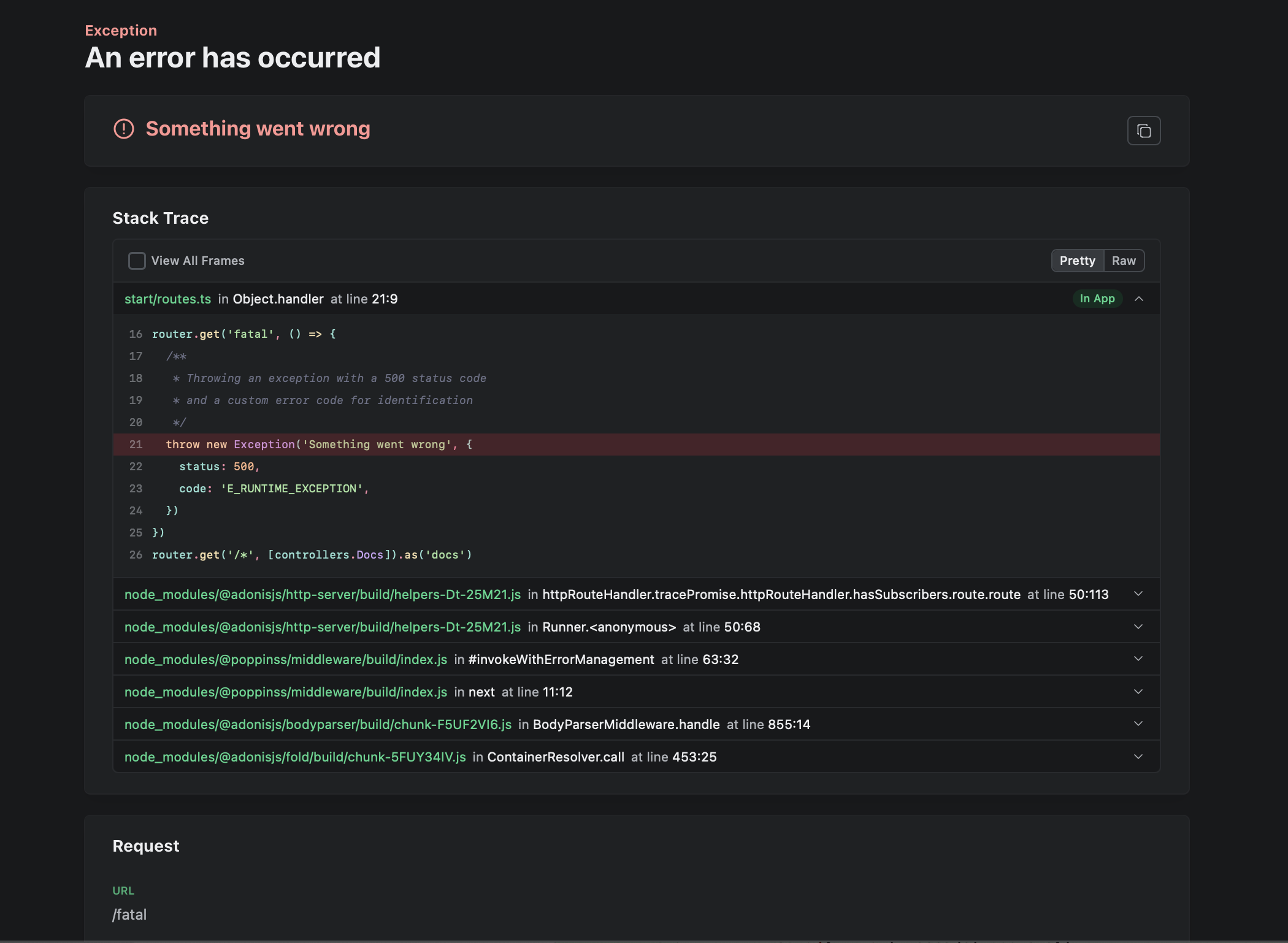
In development mode (with debug enabled), visiting this route displays a beautifully formatted error page powered by Youch, showing the error message, full stack trace, and request context.
In production mode (with debug disabled), the same error returns a simple JSON or plain text response containing only the error message, without exposing your application's internal structure.
Handling specific error types
The global exception handler's handle method receives all unhandled errors. You can inspect the error type and provide custom handling for specific exceptions while letting others fall through to the default behavior.
Here's an example of handling validation errors with a custom response format.
import { errors as vineJSErrors } from '@vinejs/vine'
import { HttpContext, ExceptionHandler } from '@adonisjs/core/http'

export default class HttpExceptionHandler extends ExceptionHandler {
  protected debug = !app.inProduction
  protected renderStatusPages = app.inProduction

  async handle(error: unknown, ctx: HttpContext) {
    /**
     * Check if the error is a VineJS validation error
     * using instanceof to safely identify the error type
     */
    if (error instanceof vineJSErrors.E_VALIDATION_ERROR) {
      /**
       * Return validation messages directly as JSON
       * with a 422 Unprocessable Entity status
       */
      ctx.response.status(422).send(error.messages)
      return
    }

    /**
     * For all other errors, delegate to the parent class
     * which handles the default error conversion logic
     */
    return super.handle(error, ctx)
  }
}
This pattern of checking error types using instanceof and providing custom handling is powerful and flexible. You can add as many conditional branches as needed for different error types in your application.
Here's how you might use this custom validation error handling in a route.
import router from '@adonisjs/core/services/router'
import { createPostValidator } from '#validators/post'

router.post('posts', async ({ request }) => {
  /**
   * If validation fails, VineJS throws E_VALIDATION_ERROR
   * which is caught by our custom handler and returns
   * the validation messages with a 422 status code
   */
  await request.validateUsing(createPostValidator)
})
Debug mode and Youch
The debug property controls whether errors are displayed using Youch, an error visualization tool that creates beautiful, interactive error pages. When debug mode is enabled, Youch displays the error message, complete stack trace, request details, and even shows the exact code where the error occurred with syntax highlighting.
In production, debug mode should always be disabled to prevent exposing sensitive information. When disabled, errors are converted to simple responses using content negotiation (JSON for API requests, plain text for others) containing only the error message without implementation details.
The default configuration protected debug = !app.inProduction automatically handles this for you, enabling debug mode in development and disabling it in production.
Status pages
Status pages allow you to display custom HTML pages for specific HTTP status codes. This feature is particularly useful for user-facing applications where you want to provide a branded, helpful error experience rather than a generic error message.
The statusPages property is a key-value map where keys are HTTP status codes or ranges, and values are callback functions that render and return HTML content. The callback receives the error object and the HTTP context, giving you full access to view rendering and error details.
export default class HttpExceptionHandler extends ExceptionHandler {
  protected statusPages: Record<StatusPageRange, StatusPageRenderer> = {
    /**
     * Handle 404 Not Found errors with a custom template
     */
    '404': (error, { view }) => {
      return view.render('pages/errors/not_found', { error })
    },
    /**
     * Handle all 5xx server errors with a single template
     * using a range notation
     */
    '500..599': (error, { view }) => {
      return view.render('pages/errors/server_error', { error })
    },
  }
}
Status pages are only rendered when the renderStatusPages property is set to true. The default configuration enables them in production (app.inProduction) where custom error pages provide a better user experience, while keeping them disabled in development where detailed Youch error pages are more useful for debugging.
Reporting errors
The report method logs errors or sends them to external monitoring services. Unlike handle, it should never send HTTP responses. These are two distinct concerns that should remain separated.
The base ExceptionHandler class provides a default implementation of report that logs errors using AdonisJS's logger. You can override this method to add custom reporting logic, such as integrating with error monitoring services.
export default class HttpExceptionHandler extends ExceptionHandler {
  async report(error: unknown, ctx: HttpContext) {
    /**
     * First call the parent report method to ensure
     * the error is logged using the default behavior
     */
    await super.report(error, ctx)

    /**
     * Add custom reporting logic here, such as
     * sending to Sentry, Bugsnag, or other services
     */
  }
}
Adding context to error reports
The context method allows you to define additional data that should be included with every error report. This contextual information helps you understand the circumstances under which an error occurred, making debugging much easier.
By default, the context includes the request ID (x-request-id header). You can override this method to include any additional information relevant to your application.
export default class HttpExceptionHandler extends ExceptionHandler {
  protected context(ctx: HttpContext) {
    return {
      /**
       * Include the unique request ID for tracking
       * this specific request across logs
       */
      requestId: ctx.request.id(),

      /**
       * Add the authenticated user's ID if available
       * to identify which user encountered the error
       */
      userId: ctx.auth.user?.id,

      /**
       * Include the IP address for security monitoring
       * and identifying patterns in errors
       */
      ip: ctx.request.ip(),
    }
  }
}
This context data is automatically included whenever an error is reported, giving you rich information about each error's circumstances without manually adding this data to every report call.
Ignoring errors from reports
Not all errors need to be reported. Some errors, like validation failures or unauthorized access attempts, are expected parts of normal application flow and don't require logging or monitoring. You can configure which errors to exclude from reporting using the ignoreStatuses and ignoreCodes properties.
export default class HttpExceptionHandler extends ExceptionHandler {
  /**
   * HTTP status codes that should not be reported.
   * These are typically client errors that don't indicate
   * problems with your application.
   */
  protected ignoreStatuses = [400, 401, 403, 404, 422]

  /**
   * Error codes that should not be reported.
   * These are application-specific error codes for
   * expected error conditions.
   */
  protected ignoreCodes = ['E_VALIDATION_ERROR', 'E_UNAUTHORIZED_ACCESS']
}
The base ExceptionHandler class checks these properties in its shouldReport method before reporting an error. If you implement custom reporting logic, you must respect this check.
export default class HttpExceptionHandler extends ExceptionHandler {
  async report(error: unknown, ctx: HttpContext) {
    /**
     * Convert the error to a standardized HTTP error
     * format that includes status code and error code
     */
    const httpError = this.toHttpError(error)

    /**
     * Only report the error if it passes the shouldReport check,
     * which verifies it's not in ignoreStatuses or ignoreCodes
     */
    if (this.shouldReport(httpError)) {
      // Your custom reporting logic here
      // For example: send to external monitoring service
    }
  }
}
This approach ensures consistent error filtering across your application, preventing your logs and monitoring services from being overwhelmed with expected errors.
Custom exceptions
Custom exceptions allow you to create specialized error classes for specific error conditions in your application's business logic. A custom exception extends the base Exception class and can implement its own handle and report methods, encapsulating both the error condition and its handling logic in a single, self-contained class.
Creating a custom exception
You can create a custom exception using the make:exception command.
node ace make:exception PaymentFailedCREATE: app/exceptions/payment_failed_exception.tsThis generates a new exception class in the app/exceptions directory. Here's what a complete custom exception looks like with both handling and reporting logic.
import { Exception } from '@adonisjs/core/exceptions'
import { HttpContext } from '@adonisjs/core/http'

export default class PaymentFailedException extends Exception {
  /**
   * The HTTP status code for this exception.
   * Set as a static property so it can be accessed
   * without instantiating the exception.
   */
  static status = 400

  /**
   * Handle the exception by converting it to an HTTP response.
   * This method is called automatically when this exception
   * is thrown and not caught.
   */
  handle(error: this, { response }: HttpContext) {
    return response
      .status(error.constructor.status)
      .send('Unable to process the payment. Please try again')
  }

  /**
   * Report the exception for logging and monitoring.
   * This method is called before handle() to record
   * the error occurrence.
   */
  report(error: this, { logger, auth }: HttpContext) {
    logger.error(
      { user: auth.user },
      'Payment failed for user %s',
      auth.user?.id
    )
  }
}
When you throw this custom exception anywhere in your application, AdonisJS automatically calls its handle method to generate the HTTP response and its report method to log the error. The global exception handler is bypassed entirely for custom exceptions that implement these methods.
When to use custom exceptions
Custom exceptions are ideal when you need to throw meaningful, business-logic-specific errors throughout your application. They're particularly useful for error conditions that require specialized handling or reporting. Unlike handling errors in the global exception handler, custom exceptions encapsulate both the error condition and its handling logic, making your error handling more organized and maintainable.
The global exception handler, on the other hand, is meant to change the default behavior for how exceptions are handled application-wide. It's the right place for cross-cutting concerns like formatting all API errors consistently or integrating with monitoring services.
Use custom exceptions when the error is specific to your domain and requires unique handling. Use the global exception handler when you need to modify how a category of errors is processed across your entire application.
Configuration reference
The exception handler class provides several configuration options that control error handling behavior:
debug
When true, displays detailed error pages with stack traces using Youch. Should be false in production. Default: !app.inProduction
renderStatusPages
When true, renders custom HTML pages for configured status codes. Default: app.inProduction
statusPages
Maps HTTP status codes or ranges to view rendering callbacks for custom error pages.
ignoreStatuses
Array of HTTP status codes that should not be reported via the report method.
ignoreCodes
Array of error codes that should not be reported via the report method.
See also
- ExceptionHandler source code - Complete implementation details of the base exception handler class
- Make exception command - CLI reference for generating custom exception classes