Application Lifecycle
This guide covers the application lifecycle in AdonisJS. You will learn:
- The three lifecycle phases (boot, start, and termination)
- When each phase executes and what happens during it
- How to hook into phases using service providers and preload files
Overview
The application lifecycle in AdonisJS consists of three distinct phases: boot, start, and termination. Each phase serves a specific purpose in preparing your application, running it, and gracefully shutting it down.
Understanding the lifecycle is essential when you need to execute code at specific points during your application's runtime. For example, you might want to register custom validation rules before your application starts handling requests, or perform cleanup operations before your application terminates.
The lifecycle flows chronologically from boot to start, and eventually to termination when the process receives a shutdown signal. Each phase has clearly defined responsibilities and happens in a predictable order, allowing you to hook into the exact moment you need.
Boot phase
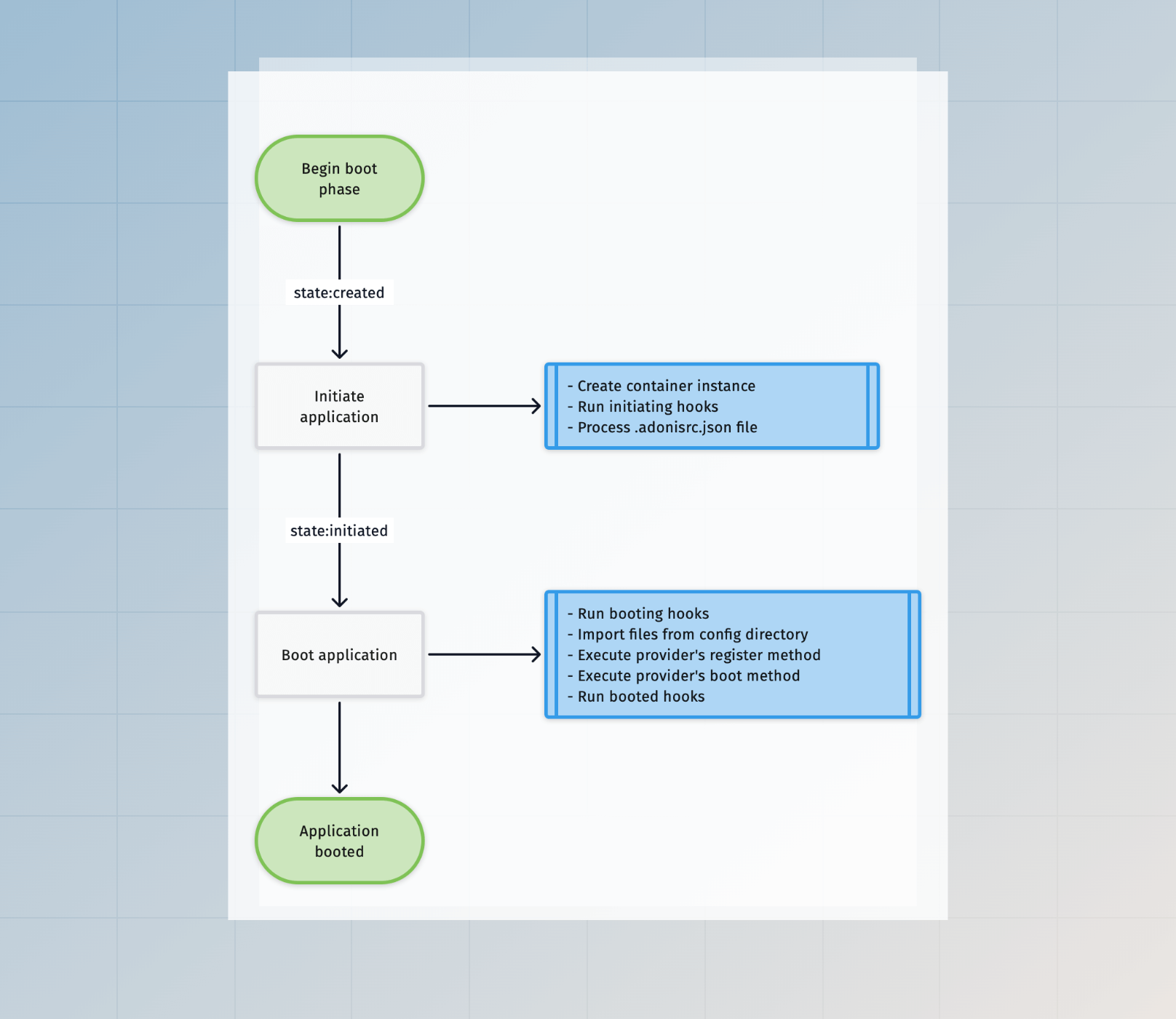
The boot phase is the initial stage where AdonisJS prepares your application for execution. During this phase, you can use the IoC container to fetch bindings and extend parts of the framework.
Service providers register their bindings into the container and execute their boot methods. The framework itself is being configured, but your application isn't yet ready to handle requests or execute commands.
The boot phase completes before any preload files are imported or application-specific code runs. Think of it as the foundation-laying phase where the framework assembles all the pieces it needs.
Start phase
The start phase is where your application comes to life. During this phase, AdonisJS imports preload files and executes the start and ready methods from service providers.
Application-specific initialization happens here. Routes are registered, event listeners are attached, and setup code runs. By the end of this phase, your application is fully operational and ready to handle HTTP requests, execute Ace commands, or run tests depending on the environment.
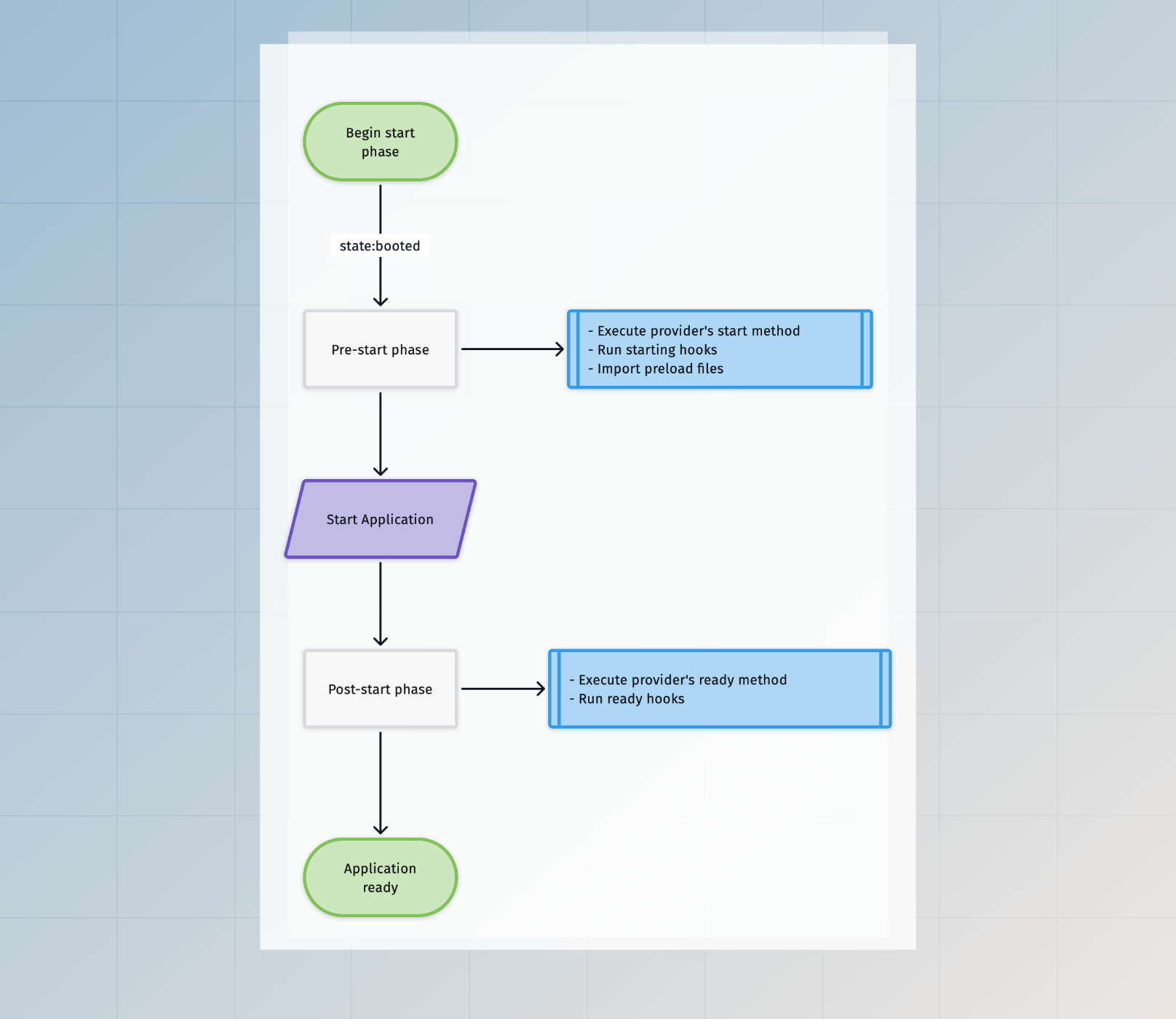
The start phase is environment-aware, meaning you can configure different behavior for the HTTP server, Ace commands, or test environments. All preload files configured for the current environment are imported in parallel for optimal performance.
Termination phase
The termination phase happens when AdonisJS begins graceful shutdown. This usually occurs when the process receives the SIGTERM signal, such as when you stop your development server or during a deployment.
During this phase, service providers execute their shutdown methods, allowing them to perform cleanup operations like closing database connections, flushing logs, or canceling pending background jobs.
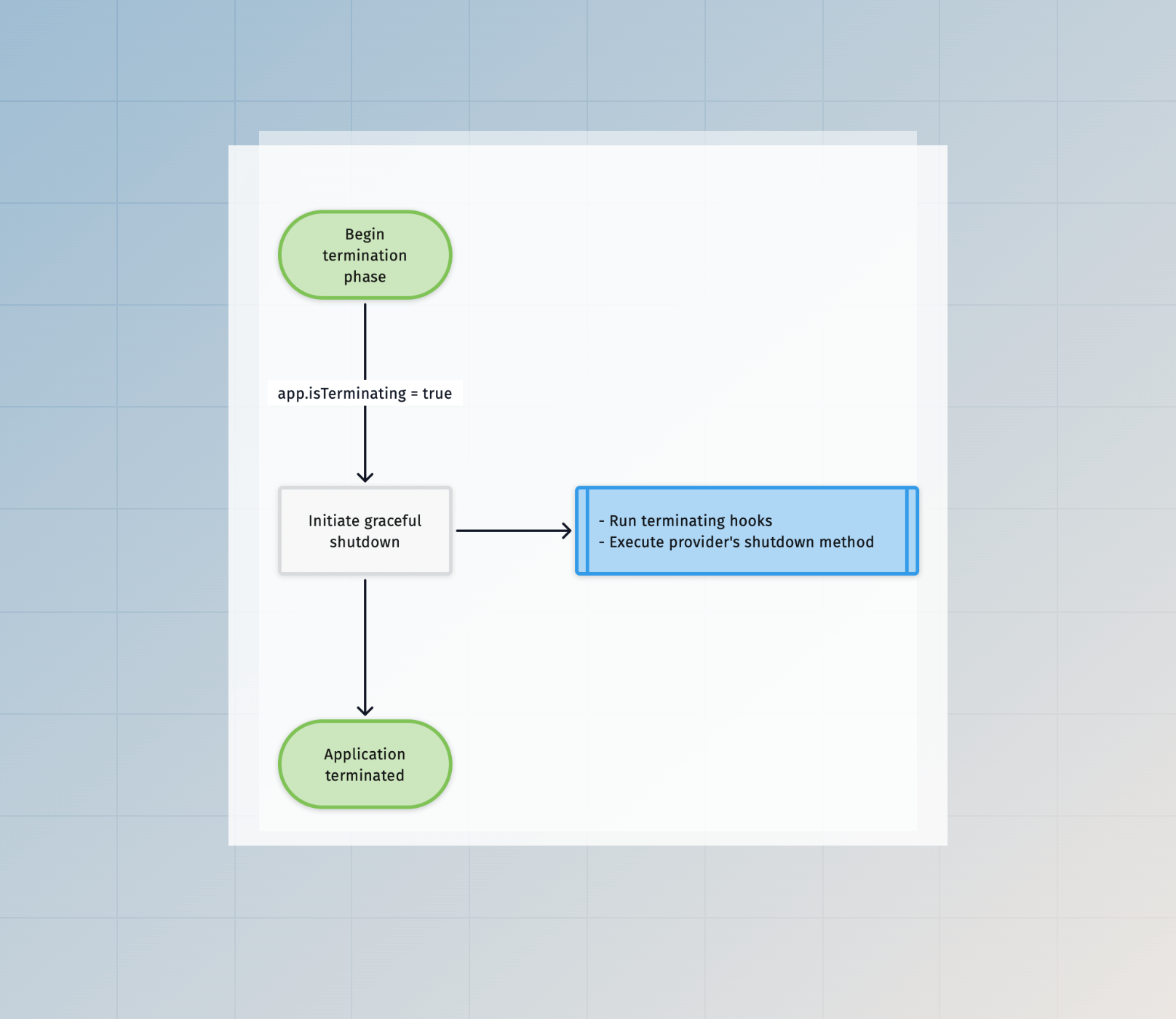
Graceful shutdown ensures your application stops cleanly rather than abruptly terminating mid-operation, helping prevent data corruption.
Hooking into lifecycle phases
You can hook into different phases of the application lifecycle using service providers and preload files. Service providers offer lifecycle methods (boot, start, ready, and shutdown) that execute at specific points, while preload files run during the start phase.
Hooking into the boot phase
Use the boot method in a service provider to execute code during the boot phase. This is where you should extend the framework or configure services that other parts of your application depend on.
The following example extends VineJS with a custom phoneNumber validation rule. This rule will be available throughout your application.
import { VineString } from '@vinejs/vine'
import type { ApplicationService } from '@adonisjs/core/types'

export default class AppProvider {
  constructor(protected app: ApplicationService) {}

  async boot() {
    VineString.macro('phoneNumber', function (this: VineString) {
      return this.use((value, field) => {
        if (typeof value !== 'string') {
          return
        }

        if (!/^\d{10}$/.test(value)) {
          field.report('The {{ field }} must be a valid 10-digit phone number', field)
        }
      })
    })
  }
}
Hooking into the start phase
You can hook into the start phase using either service provider methods or preload files. Service providers offer start and ready methods, while preload files provide a simpler approach for application-specific initialization.
Using service provider methods
The start method executes after the boot phase completes but before the application is ready. The ready method executes once the application is fully started and ready to handle requests or commands.
import type { ApplicationService } from '@adonisjs/core/types'

export default class AppProvider {
  constructor(protected app: ApplicationService) {}

  async start() {
    const database = await this.app.container.make('lucid.db')

    /**
     * Verify database connection is working
     */
    await database.connection().select(1)
  }

  async ready() {
    if (this.app.getEnvironment() === 'web') {
      const logger = await this.app.container.make('logger')
      logger.info('HTTP server is ready to accept requests')
    }
  }
}
Using preload files
Preload files offer a simpler way to run code during the start phase without creating a service provider. They're ideal for application-specific initialization like registering routes, attaching event listeners, or configuring middleware.
Create a preload file using the make:preload command.
node ace make:preload eventsThis command creates a new file in the start directory and automatically registers it in your adonisrc.ts configuration file.
import emitter from '@adonisjs/core/services/emitter'
import logger from '@adonisjs/core/services/logger'

emitter.on('user:registered', function (user) {
  logger.info({ userId: user.id }, 'New user registered')
})

emitter.on('order:placed', function (order) {
  logger.info({ orderId: order.id }, 'New order placed')
})
You can configure preload files to load only in specific runtime environments.
{
  preloads: [
    () => import('#start/routes'),
    () => import('#start/kernel'),
    {
      file: () => import('#start/events'),
      environment: ['web', 'console']
    }
  ]
}
The environment property accepts an array of values: web (HTTP server), console (Ace commands), test (test runner), and repl (REPL environment).
Hooking into the termination phase
Use the shutdown method in a service provider to execute cleanup operations during graceful shutdown. This ensures resources are properly released before your application terminates.
import type { ApplicationService } from '@adonisjs/core/types'

export default class AppProvider {
  constructor(protected app: ApplicationService) {}

  async shutdown() {
    const redis = await this.app.container.make('redis')

    /**
     * Close all Redis connections
     */
    await redis.quit()

    const logger = await this.app.container.make('logger')
    logger.info('Application shutdown complete')
  }
}
See also
-
Service providers guide for learning how to create and register service providers, and understand the complete lifecycle of the
register,boot,start,ready, andshutdownmethods - AdonisRC file reference for complete reference on configuring preload files and other application settings