Middleware
This guide covers middleware in AdonisJS applications. You will learn how to:
- Work with the three middleware stacks (server, router, and named)
- Create custom middleware to handle cross-cutting concerns
- Register middleware in the appropriate stack
- Pass parameters to named middleware for route-specific logic
- Use dependency injection in middleware constructors
- Modify requests and responses during the middleware pipeline
- Handle exceptions within middleware
- Augment the HttpContext with custom properties
Overview
Middleware are functions that execute during an HTTP request before the request reaches your route handler. Each middleware in the chain can either terminate the request by sending a response or forward it to the next middleware using the next method.
The middleware layer allows you to encapsulate logic that must run during a request into dedicated, reusable functions or classes. Instead of cluttering your controllers with repetitive logic for parsing request bodies, authenticating users, or logging requests, you can offload these responsibilities to dedicated middleware.
Every HTTP request your application handles flows through the middleware pipeline, making it essential to understand how middleware work and how to organize them effectively.
Middleware stacks
AdonisJS divides middleware into three categories, known as stacks. Each stack serves a different purpose and executes at different points in the request lifecycle.
Server middleware stack
- Executes for every HTTP request, even when no route matches
- Runs before the router attempts to find a matching route
- Use for: logging, CORS, security headers, logging
Router middleware stack
- Executes only when a matching route is found
- Runs after route matching but before named middleware and handlers
- Use for: loading shared data, parsing request bodies
Named middleware collection
- Applied explicitly to individual routes or route groups
- Can accept parameters for per-route customization
- Use for: role-based authorization, route-specific rate limiting, feature flags
Creating and using middleware
Let's walk through creating a complete logging middleware that tracks request duration. We'll generate the middleware file, implement the logging logic, and register it to run on all requests.
-
Generating the middleware
Create a new middleware using the
make:middlewarecommand. This command generates a scaffolded middleware class in theapp/middlewaredirectory.node ace make:middleware LogRequests# CREATE: app/middleware/log_requests_middleware.tsThe generated middleware contains a basic class structure with a
handlemethod where we'll add our logging logic:app/middleware/log_requests_middleware.tsimport type { HttpContext } from '@adonisjs/core/http' import type { NextFn } from '@adonisjs/core/types/http' export default class LogRequestsMiddleware { async handle(ctx: HttpContext, next: NextFn) { /** * Logic to run before the request handler */ await next() /** * Logic to run after the request handler */ } } -
Implementing the logging logic
Now let's implement the actual logging functionality. We'll track how long each request takes by capturing the start time before calling
next(), then calculating the duration after the response is ready.app/middleware/log_requests_middleware.tsimport type { HttpContext } from '@adonisjs/core/http' import type { NextFn } from '@adonisjs/core/types/http' import string from '@adonisjs/core/helpers/string' export default class LogRequestsMiddleware { async handle({ request, response, logger }: HttpContext, next: NextFn) { /** * Capture the start time before calling next(). * This happens in the downstream phase. */ const startTime = process.hrtime() /** * Call next() to execute remaining middleware and route handler. * The await ensures we wait for the entire chain to complete. */ await next() /** * After next() completes, we're in the upstream phase. * The response is ready, so we can log the completion details. */ const endTime = process.hrtime(startTime) const responseStatus = response.getStatus() const uri = request.url() const method = request.method() logger.info(`${method} ${uri}: ${responseStatus} (${string.prettyHrTime(endTime)})`) } } -
Registering the middleware
Finally, let's register our logging middleware in the server middleware stack so it runs for every request. We will register it as the first middleware, so that we can precisely time all the requests.
Server middleware are registered in the
start/kernel.tsfile using lazy imports, and they execute in the order they're registered.start/kernel.tsimport server from '@adonisjs/core/services/server' server.use([ () => import('#middleware/log_requests_middleware'), () => import('#middleware/container_bindings_middleware'), () => import('#middleware/force_json_response_middleware'), () => import('@adonisjs/core/bodyparser_middleware'), ])
Named middleware with parameters
Named middleware provide flexibility by allowing you to apply them selectively to specific routes and pass parameters to customize their behavior. Let's build an authorization middleware that checks user permissions, register it with a name, and apply it to protected routes.
-
Creating the authorization middleware
We'll create a middleware that checks if the authenticated user has the required role or permissions to access a route. Named middleware can accept a third parameter for options, making them configurable per-route.
app/middleware/authorize_request_middleware.tsimport type { HttpContext } from '@adonisjs/core/http' import type { NextFn } from '@adonisjs/core/types/http' type AuthorizationOptions = | { permissions: string[] } | { role: string } export default class AuthorizeRequestMiddleware { /** * The third parameter 'options' contains the authorization requirements * specified when applying this middleware to a route. */ async handle({ auth, response }: HttpContext, next: NextFn, options: AuthorizationOptions) { /** * Get the authenticated user or throw an exception */ const user = auth.getUserOrFail() /** * Check if the user has the required role */ if ('role' in options && user.role !== options.role) { return response.unauthorized('Not authorized to access this route') } /** * Check if the user has all required permissions */ if ('permissions' in options) { const hasPermission = options.permissions.every(permission => user.permissions.includes(permission) ) if (!hasPermission) { return response.unauthorized('Not authorized to access this route') } } /** * User is authorized, continue to the next middleware or handler */ await next() } } -
Registering the named middleware
Now let's register our authorization middleware with the name
authorizein thestart/kernel.tsfile. Exporting the middleware collection enables full TypeScript type safety when using it in routes.start/kernel.tsimport router from '@adonisjs/core/services/router' export const middleware = router.named({ authorize: () => import('#middleware/authorize_request_middleware'), }) -
Applying the middleware to routes
Finally, let's apply our
authorizemiddleware to specific routes. Import the middleware collection fromstart/kernel.tsto get full TypeScript autocomplete and type checking for the options parameter.start/routes.tsimport router from '@adonisjs/core/services/router' import { middleware } from '#start/kernel' router .get('/admin/reports', async () => { return { message: 'Admin reports' } }) .use(middleware.authorize({ role: 'admin' })) router .post('/posts', async () => { return { message: 'Post created' } }) .use(middleware.authorize({ permissions: ['posts.create'] }))Your authorization middleware is now protecting routes with type-safe, configurable permission checks!
Dependency injection in middleware
Middleware classes are instantiated using the IoC container, allowing you to inject dependencies directly into the middleware constructor. Dependencies can only be injected through the constructor, not as method parameters. The container will automatically resolve and inject your dependencies when creating the middleware instance.
See also: Dependency Injection guide
import { inject } from '@adonisjs/core'
import type { HttpContext } from '@adonisjs/core/http'
import type { NextFn } from '@adonisjs/core/types/http'
import RateLimitService from '#services/rate_limit_service'

@inject()
export default class RateLimitMiddleware {
  /**
   * The IoC container automatically creates an instance of
   * RateLimitService and injects it here.
   */
  constructor(protected rateLimitService: RateLimitService) {
  }

  async handle({ request, response }: HttpContext, next: NextFn) {
    const ip = request.ip()
    const isAllowed = await this.rateLimitService.checkLimit(ip)

    if (!isAllowed) {
      return response.tooManyRequests('Rate limit exceeded')
    }

    await next()
  }
}
Understanding middleware execution flow
Middleware execute in two phases: the downstream phase and the upstream phase. Understanding this flow is crucial for knowing where to place your logic within a middleware.
The downstream phase occurs before the await next() call. During this phase, the request travels through each middleware in order: Server middleware → Router middleware → Named middleware → Route handler.
The upstream phase occurs after the await next() call. During this phase, the response travels back through the middleware in reverse order: Route handler → Named middleware → Router middleware → Server middleware.
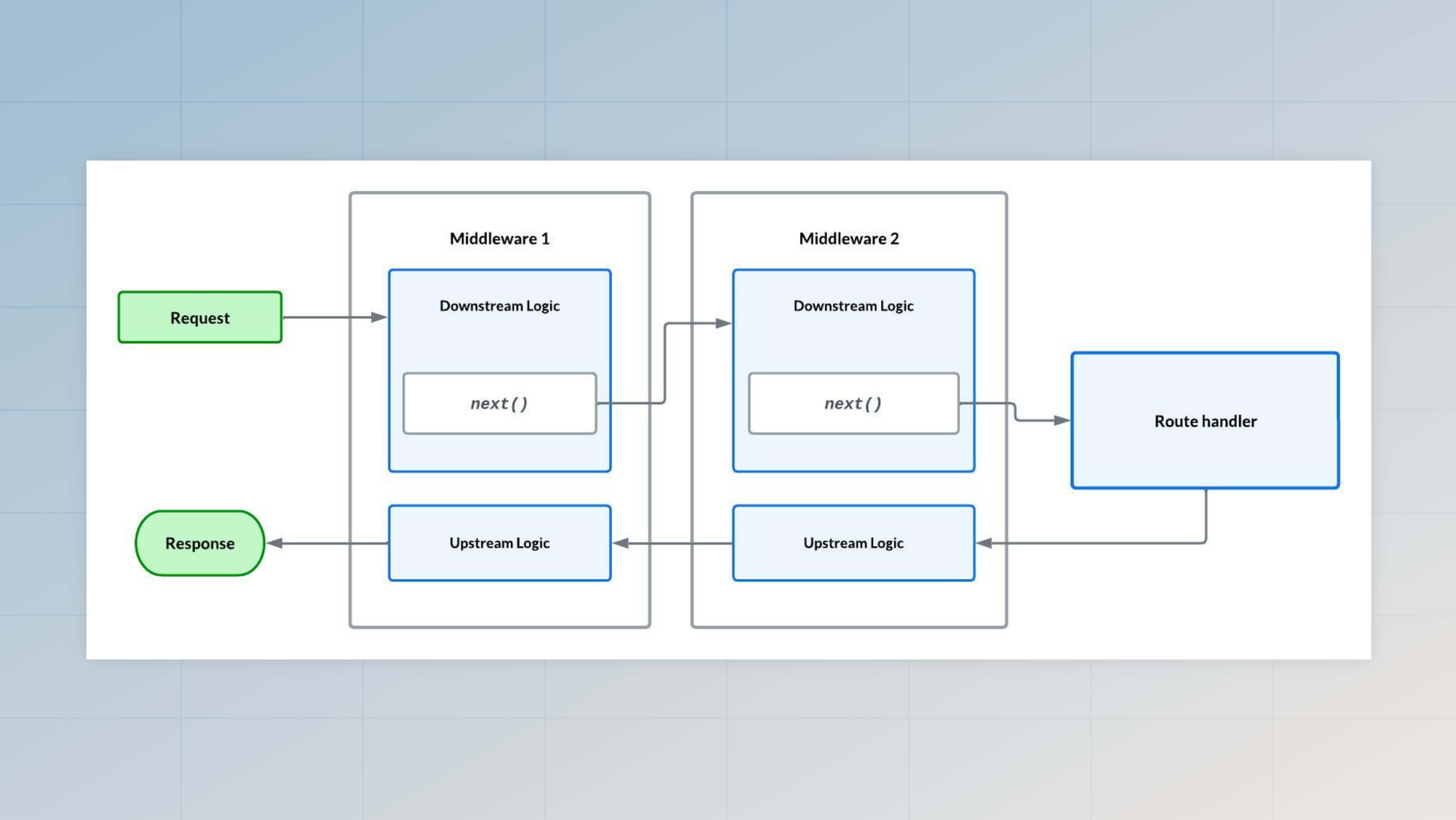
This two-phase execution allows middleware to execute logic both before and after the route handler runs. The logging middleware example demonstrates this pattern by capturing the start time in the downstream phase and calculating the duration in the upstream phase.
Modifying the response
Middleware can modify the response during both the downstream and upstream phases. Since the response object is mutable, changes you make in middleware will affect the final response sent to the client.
Adding headers in the upstream phase
A common pattern is adding headers to the response after the route handler completes. Placing header logic after await next() ensures the response has been fully constructed by the handler before you modify it.
import type { HttpContext } from '@adonisjs/core/http'
import type { NextFn } from '@adonisjs/core/types/http'

export default class AddHeadersMiddleware {
  async handle({ response }: HttpContext, next: NextFn) {
    /**
     * Wait for the handler to construct the response
     */
    await next()

    /**
     * Add custom headers after the response is ready
     */
    response.header('X-Powered-By', 'AdonisJS')
    response.header('X-Response-Time', Date.now().toString())
  }
}
Transforming the response body
You can also transform the response body in middleware by accessing and modifying it in the upstream phase. This middleware wraps all response bodies in a consistent format with metadata.
import type { HttpContext } from '@adonisjs/core/http'
import type { NextFn } from '@adonisjs/core/types/http'

export default class WrapResponseMiddleware {
  async handle({ response }: HttpContext, next: NextFn) {
    /**
     * Wait for the handler to generate the response
     */
    await next()

    /**
     * Wrap the original response in a standard envelope
     */
    const body = response.getBody()

    response.send({
      success: true,
      data: body,
      timestamp: new Date().toISOString()
    })
  }
}
Exception handling
When a middleware throws an exception, AdonisJS's global exception handler catches and processes it just like exceptions thrown from route handlers. The upstream flow continues as normal, meaning any middleware that already executed in the downstream phase will still execute their upstream code.
See also: Exception handling guide
import type { HttpContext } from '@adonisjs/core/http'
import type { NextFn } from '@adonisjs/core/types/http'
import { errors } from '@adonisjs/core'

export default class ValidateApiKeyMiddleware {
  async handle({ request }: HttpContext, next: NextFn) {
    const apiKey = request.header('X-API-Key')

    if (!apiKey) {
      /**
       * Throwing an exception terminates the request.
       * The global exception handler will catch and handle this.
       */
      throw new errors.E_UNAUTHORIZED_ACCESS('API key is required')
    }

    await next()
  }
}
Conditional middleware execution
AdonisJS does not provide a way to conditionally register or apply middleware at runtime. However, middleware can use configuration files to decide at runtime whether they should execute for the current request. This pattern lets you control middleware behavior through environment variables or configuration files without changing your middleware registration.
export default {
  enableRateLimit: env.get('ENABLE_RATE_LIMIT', true),
}import type { HttpContext } from '@adonisjs/core/http'
import type { NextFn } from '@adonisjs/core/types/http'
import featuresConfig from '#config/features'
export default class RateLimitMiddleware {
async handle(ctx: HttpContext, next: NextFn) {
/**
* Skip rate limiting if disabled in configuration.
* Immediately call next() to make this middleware a no-op.
*/
if (!featuresConfig.enableRateLimit) {
return next()
}
/**
* Apply rate limiting logic when enabled
*/
// ... rate limit checks
await next()
}
}Extending the HttpContext
Middleware can add custom properties to the HttpContext object to share data with downstream middleware and route handlers. However, this requires TypeScript module augmentation to ensure the properties appear at the type level.
Adding properties to the context
import type { HttpContext } from '@adonisjs/core/http'
import type { NextFn } from '@adonisjs/core/types/http'

export default class DetectTenantMiddleware {
  async #detectTenant(ctx: HttpContext) {
    // ... tenant detection logic
    return { id: 1, name: 'Acme Corp' }
  }

async handle(ctx: HttpContext, next: NextFn) {
    /**
     * Detect tenant from subdomain, header, or database
     */
    const tenant = await this.#detectTenant(ctx)

    /**
     * Add tenant to context for downstream middleware and the
     * route handler
     */
    ctx.tenant = tenant

    await next()
  }
}
Augmenting the HttpContext type
To make TypeScript aware of the new tenant property, you must augment the HttpContext interface. After augmentation, TypeScript will recognize ctx.tenant in all your middleware and route handlers.
When you augment the HttpContext interface, the type changes are global. However, if you add properties via named middleware that only runs on specific routes, those properties will not exist at runtime on routes where the middleware doesn't execute.
Only augment the HttpContext in server or router middleware that run broadly across your application.
declare module '@adonisjs/core/http' {
  interface HttpContext {
    tenant: {
      id: number
      name: string
    }
  }
}